

In partnership with

200 Ways To Make Money With AI

Ready to transform artificial intelligence from a buzzword into your personal revenue generator?
HubSpot’s groundbreaking guide "200+ AI-Powered Income Ideas" is your gateway to financial innovation in the digital age.
Inside you'll discover:
A curated collection of 200+ profitable opportunities spanning content creation, e-commerce, gaming, and emerging digital markets, each vetted for real-world potential
Step-by-step implementation guides designed for beginners, making AI accessible regardless of your technical background
Cutting-edge strategies aligned with current market trends, ensuring your ventures stay ahead of the curve
Download your guide today and unlock a future where artificial intelligence powers your success. Your next income stream is waiting.
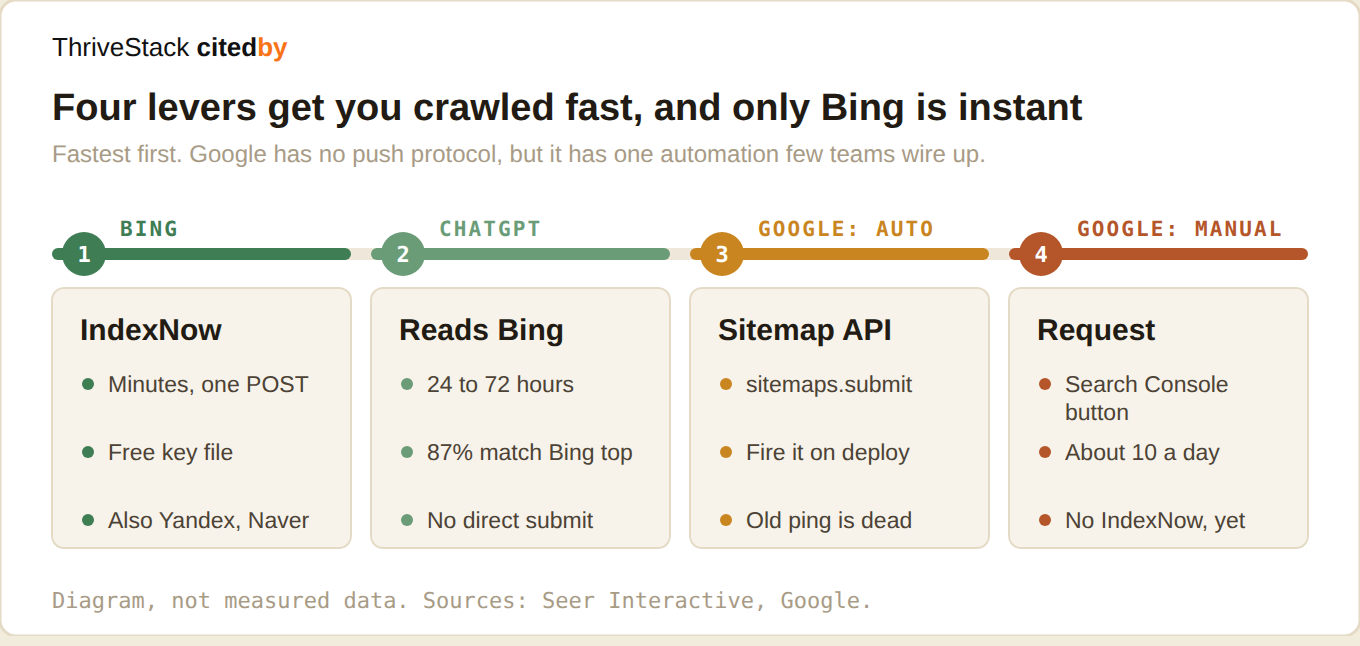
Bing indexes in minutes if you push. ChatGPT reads Bing. That is the fastest lever in this entire discipline, and almost no B2B team has wired it up.
Seer Interactive analysed thousands of ChatGPT citations and found 87% matched Bing's top results. ChatGPT runs its own crawlers, but Bing's index heavily shapes what it surfaces.
So the chain is: you publish, IndexNow pushes to Bing in minutes, and ChatGPT's retrieval layer picks it up on its next cycle, typically 24 to 72 hours. Against days or weeks if you wait to be crawled.
IndexNow pushes to Bing in minutes. It is a single HTTP POST, and it is free.
Wire up IndexNow. It takes fifteen minutes.
IndexNow is an open push protocol. You host a key file, then POST your changed URLs whenever you publish. One call reaches Bing, Yandex, Naver and Seznam at once. Over five billion URLs a day go through it.
Put that POST in your publish pipeline. WordPress, Wix, Duda and Cloudflare all have one-click integrations. If you are on a custom stack it is one function call in your deploy step.
Google does not support IndexNow. Here is what does work.
Google has been testing IndexNow since 2021 and still has not adopted it. There is no push button. But there are four real levers, and most teams are using none of them.
Manual, for one urgent URL. Search Console, URL Inspection, Request Indexing. Paste the URL, click the button. The soft ceiling is around ten a day per property. Use it for a launch page or a correction, not as a process.
Manual, for a batch. Resubmit the sitemap in Search Console. This does nothing on its own if your lastmod dates are decorative. It does a lot if they are honest.
Automated, and supported. The old unauthenticated sitemap ping is dead. Google announced its removal in June 2023 and the endpoint now returns a 404. What replaced it is the Search Console API sitemap submit, which is authenticated. Call it from your deploy step, right after the sitemap regenerates. That is the sanctioned automated path and almost nobody wires it up.
Automated, and read-only. The URL Inspection API gives you 2,000 checks a day. It cannot push anything. It tells you whether your push worked, which is how you turn crawl delay from a feeling into a number.
About the Google Indexing API. Read this before you build on it.
You will find dozens of posts telling you to fire the Indexing API at every new blog post. Be careful. Google documents it as restricted to JobPosting or BroadcastEvent embedded in a VideoObject. Nothing else. The default quota is 200 URLs a day.
It will happily return 200 OK for any URL you send it. That is an acknowledgement, not permission, and not a promise to crawl. People report it working for ordinary pages. People also report it doing nothing. You are outside the documented contract either way, so do not make it the load-bearing part of your pipeline.
If you genuinely publish job postings or live event video, apply for quota and use it properly. Everyone else: the sitemap submit is the boring answer, and it is the one that is actually supported.
The asymmetry here is the real finding. The engine your buyers increasingly use is the one you can reach in minutes. The engine you have optimised for over a decade is the slow one, and it wants to be asked politely.
 | Aleyda Solís Orainti · on AI search crawlability
|
Crawl delay, and the mistake people make with it
The Crawl-delay directive in robots.txt asks a crawler to wait N seconds between requests. Bing and Yandex honour it. Google ignores it entirely. Most AI crawlers ignore it too.
The mistake is setting a high crawl delay to protect your server, then wondering why Bing is slow to pick up new content. If you set Crawl-delay: 10 you have asked Bing to fetch at most 8,640 pages a day, which for a large site means your new content waits behind everything else.
Unless your server is genuinely struggling, remove it. If you need rate limiting, do it in your CDN where you can be precise, not with a blunt directive that only the engines you want slows down.
The rest of the freshness stack
lastmod that tells the truth. Crawlers learn to distrust sitemaps where every URL claims to have changed today. Set lastmod only when the content actually changed, and they will start trusting it.
Bing Webmaster Tools. Free, five minutes to set up, and it is now the single most under-used tool in AI visibility, because it is your direct line into the index ChatGPT leans on.
Do not block the AI crawlers. Plenty of teams added a Disallow for GPTBot in 2024 during the training-data panic and never revisited it. Check your robots.txt today. You may be paying for content nobody is allowed to read.