|
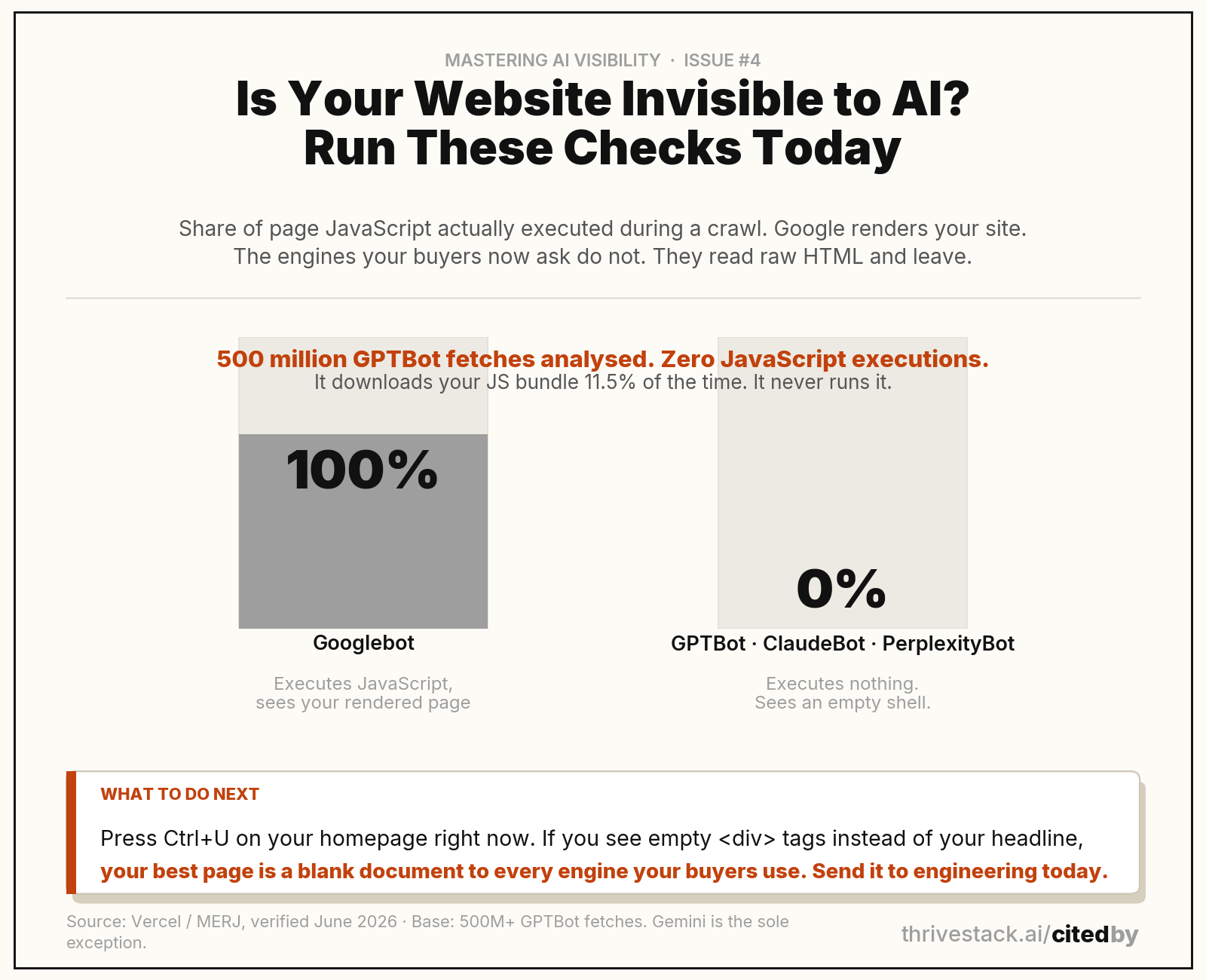
AI crawlers do not execute JavaScript. Not some of them. None of the major ones. Vercel and MERJ analysed more than 500 million GPTBot fetches and found zero JavaScript executions. GPTBot downloads your JS bundle about 11.5% of the time, and never runs it.
So if your content only exists after JavaScript renders it, your best page is a blank document to the engines your buyers are asking. No content optimization fixes this. It has to be fixed underneath.
This is what we call client-side ghosting, and B2B sites are full of it.
The trap is that Google hides the problem from you. Googlebot does render JavaScript. Your Search Console looks healthy, your pages are indexed, everything reads normal. Meanwhile GPTBot, ClaudeBot and PerplexityBot arrive, read raw HTML, find an empty shell, and leave. Gemini is the one exception, because it rides Googlebot’s rendering service.
The six-step AI crawlability audit
|
1
|
View page source on your homepage.
Press Ctrl+U on Windows or Cmd+Option+U on Mac. This is what an AI crawler sees. Can you find your headline and your product description in the raw HTML? If you mostly see empty tags and script bundles, you have client-side ghosting. Repeat on your three most important landing pages.
|
|
2
|
Read your robots.txt.
Go to yourdomain.com/robots.txt. Look for Disallow rules aimed at GPTBot, OAI-SearchBot, ClaudeBot, PerplexityBot or Google-Extended. Plenty of teams blocked these in 2024 during the training-data panic and never revisited it. If you are blocking them, you are choosing to be invisible.
|
|
3
|
Compare rendered vs. Raw in Search Console.
Run URL Inspection on your homepage. Look at the rendered view, then look at the page source. The difference between those two is exactly what AI crawlers cannot see. That delta is your problem, measured.
|
|
4
|
Check for an llms.txt.
Go to yourdomain.com/llms.txt. A 404 means you do not have one. It is a plain-text file that tells AI tools what your company is and which pages matter. Full issue on it in Week 6.
|
|
5
|
Validate your structured data.
Run your homepage through validator.schema.org. You want an Organization schema carrying name, url, description, sameAs and logo. No Organization schema means machines are guessing at what you are.
|
|
6
|
Test answer density on your money pages.
Take your three most important buyer-facing pages. Does the core answer appear in the first 150 words? Or does the page build to it around paragraph nine? Machines extract from the top. A buried answer is an uncited one.
|
Fixing client-side ghosting: JavaScript, SSR, and what to tell engineering
The fix is server-side rendering or static site generation. Both need engineering, so you are going to have to make the case. Here is the sentence that works:
To engineering: "AI crawlers do not execute JavaScript. Vercel analysed 500M+ GPTBot fetches and found zero JS executions. Our content has to be in the raw HTML or it does not exist to ChatGPT, Claude or Perplexity. Right now, [page URL] renders client-side. Ctrl+U shows empty divs. We need SSR or SSG on our top [N] buyer-facing pages."
If you are on WordPress, HubSpot CMS or Webflow, you are probably fine. Those render server-side by default. If you are on a client-side JavaScript framework, you are probably not. Run the Ctrl+U check either way. Assume nothing.
Source: Humans of Martech, ep. 202, Jan 2026
“Your site’s technical foundations decide your visibility in AI search.”
 |
Aleyda Solís
Orainti · on AI search crawlability
|
Source: Humans of Martech, ep. 202, Jan 2026
This week's fix
Open your homepage. Press Ctrl+U. If you see empty tags and script bundles where your headline should be, send it to engineering today with the phrase “client-side ghosting”.
Then check your robots.txt for a Disallow on GPTBot. Those two checks take five minutes and account for most of the invisible websites we audit.
Frequently Asked Questions
Do AI crawlers execute JavaScript?
No. Vercel and MERJ analysed over 500 million GPTBot fetches and found zero JavaScript executions. The same holds for OAI-SearchBot, ClaudeBot, Claude-SearchBot, PerplexityBot, Meta-ExternalAgent and Bytespider. Google Gemini is the only meaningful exception, because it uses Googlebot rendering infrastructure. If your content requires JavaScript to appear, it does not exist to any of the others.
If Google can crawl my site, can AI tools crawl it too?
No, and this is the trap. Googlebot renders JavaScript. Most AI crawlers do not. A site that is fully indexed and healthy in Search Console can be completely invisible to ChatGPT and Perplexity. You have to check each user agent separately.
What should my robots.txt look like for AI crawlability?
At minimum, no Disallow rules targeting GPTBot, OAI-SearchBot, ClaudeBot, PerplexityBot, Google-Extended, Googlebot or Bingbot. The simplest version is User-agent: * followed by Allow: /, which lets every crawler reach every page. Check this even if you think it is fine. A lot of teams blocked AI bots in 2024 and forgot.
I use a popular CMS. Am I at risk of client-side ghosting?
Probably not. WordPress, HubSpot CMS and Webflow render server-side by default. Sites built on client-side JavaScript frameworks are where the risk lives. Run the Ctrl+U check anyway, because plenty of hybrid setups render the important parts client-side without anyone noticing.
How quickly will AI visibility improve after I fix this?
It depends on the engine. Perplexity refetches often, so improvements can appear within days of a fix going live. ChatGPT updates on longer cycles. Expect four to eight weeks before the full signal lands. The fix is not slow. The propagation is.
Does blocking AI crawlers protect my content?
It stops you being cited. That is the trade. Blocking GPTBot does not remove you from a model already trained. It removes you from the live retrieval that decides who gets named in the answer your buyer reads today. Most B2B teams who blocked in 2024 were solving for a training-data worry and did not realise they were opting out of the new discovery channel.
|